
Pinfluence Intel · for Pinterest® creators and bloggers
Keep every month of your Pinterest stats, even after Pinterest stops showing them.
Upload your stats and Intel saves them for good, ranks your pins by the clicks they send you, and tells you when another account copies one.
✓7-day money-back guarantee · Cancel anytime · Your code price stays locked in
The research database behind Intel and Discover
Independent tool, not affiliated with Pinterest, Inc. Intel works only from the stats you export and never logs in to your Pinterest account.
Pinterest hands you just enough data to feel informed, and not nearly enough to plan with.
For a lot of solo creators, three things go missing on Pinterest. You rarely notice until the moment you need them.
Your history. Pinterest only shows a rolling window of your stats, so last year’s numbers may be gone by the time you plan this year’s big season.
Your winners. A small handful of pins usually drives most of your traffic, and without a way to line them up, it’s hard to tell which ones.
Your work, once it leaves your hands. Pins that do well get copied onto other accounts, and unless you stumble across a copy, you never know.
All three come down to the same thing: the information exists, it’s just hard to get to.
Intel puts all three in one place.
Intel turns the performance data Pinterest already has on your account into something you can use, and keep. Your full history, your best pins ranked, the topics pulling your traffic, and a watch for copies of your pins.
Nothing here is data you don’t already own. It’s your account’s own numbers, finally organized, saved for good, and easy to act on.
How Pinfluence Intel works.
1
Upload your Pinterest stats
Export your analytics from Pinterest and drop the file into Intel; it takes about a minute. Starter includes 1 upload a month for one account, and Pro and Max are unlimited.
2
Intel keeps and organizes it
Every upload joins your running history and is sorted into your numbers over time, your top pins and the topics driving your traffic. Nothing rolls off or expires.
3
You plan from the full picture
Instead of guessing from the last few months, you work from your whole history: what worked last season, which pins to make more of, and what’s quietly slipping.
Analytics History
Plan this season from last year’s numbers, not from memory.
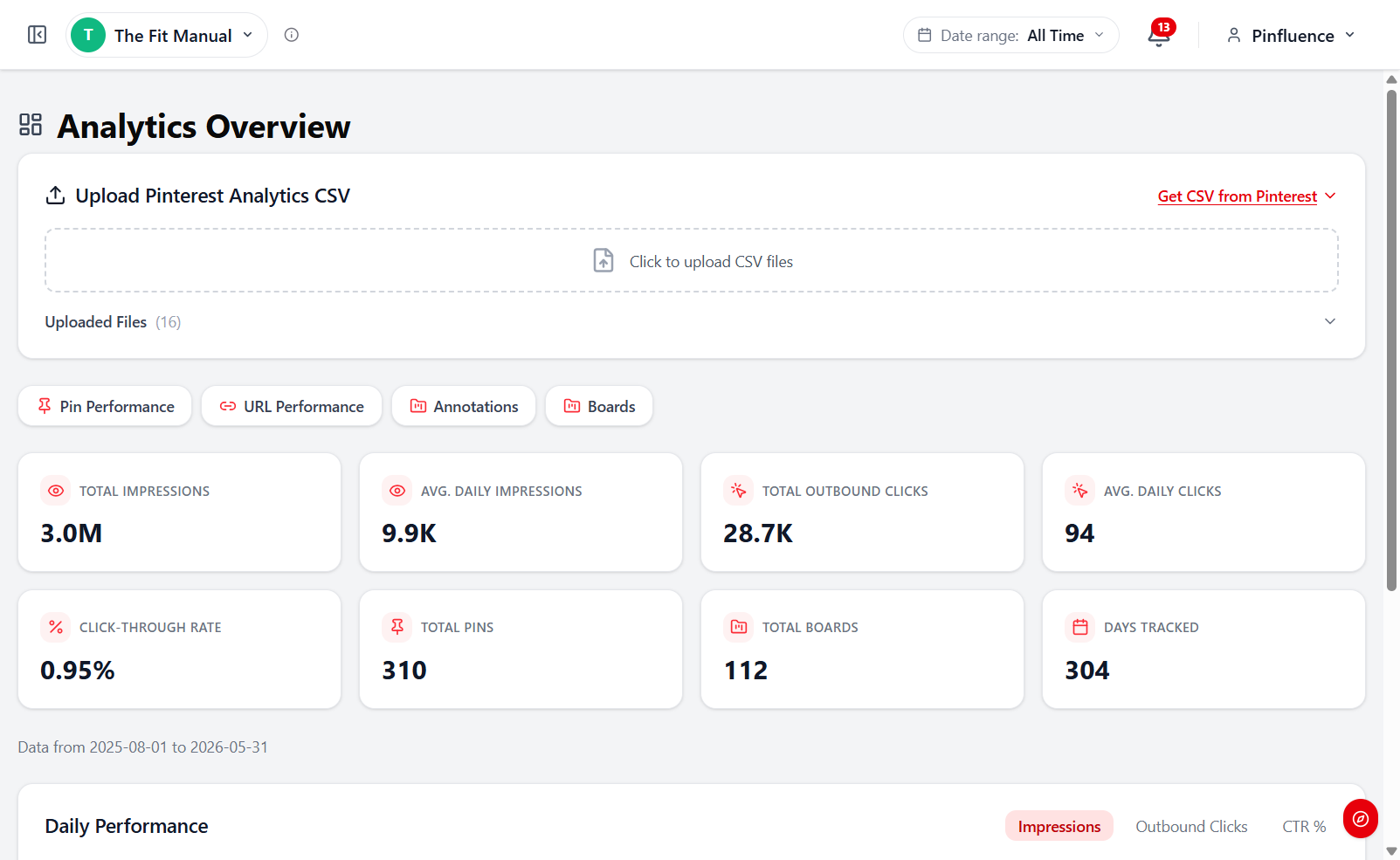
Pinterest shows you a rolling window and quietly drops the rest. Intel keeps every upload in a running history of your impressions, clicks and saves, stored by the day and never wiped.
So when you plan, last year’s big season is still there, and you can see how this month compares to the same month a year ago. The longer you use it, the more history you have to plan from.
Top Pins
See which pins are actually carrying your traffic.
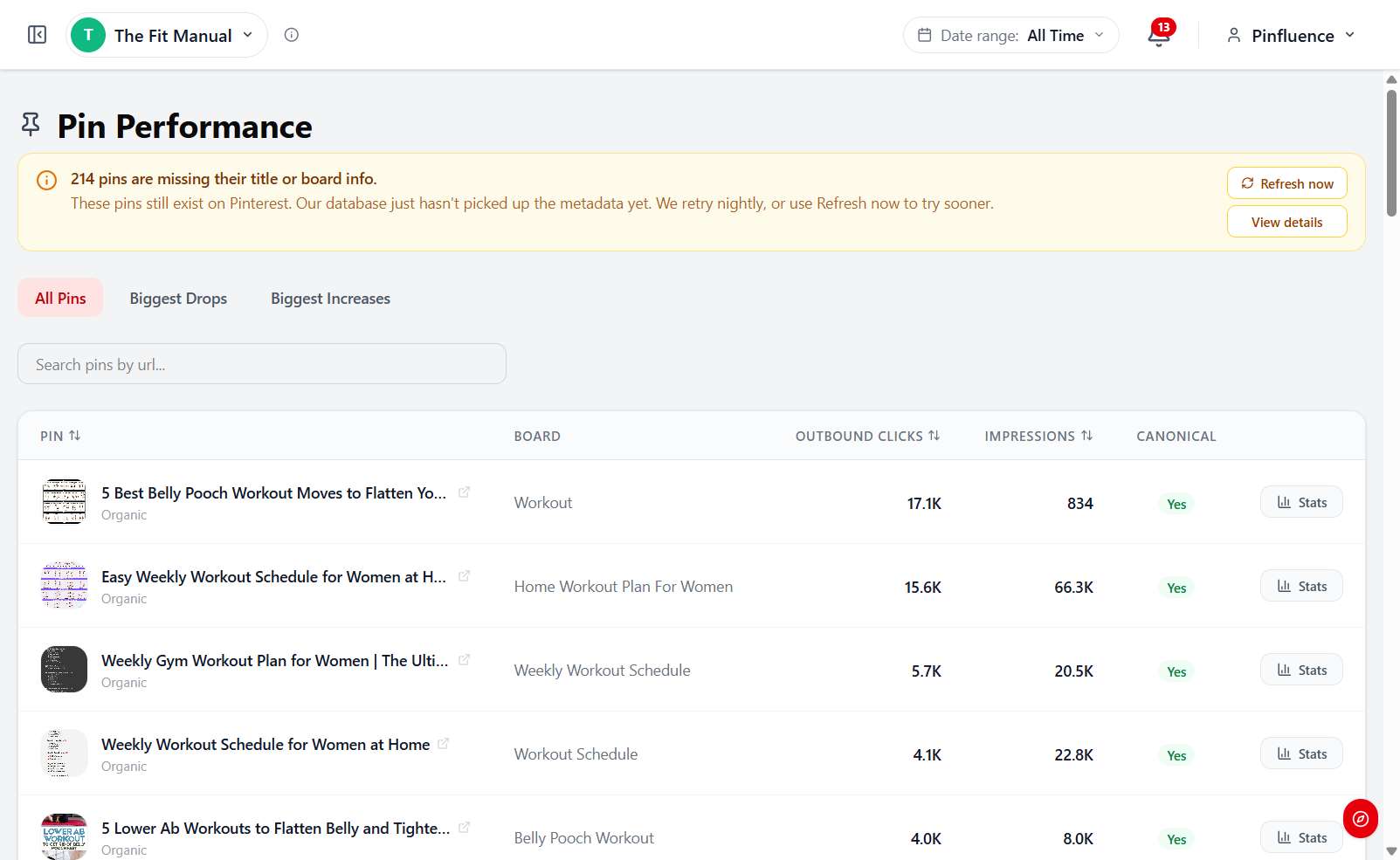
Most of your traffic comes from a small number of pins. Intel ranks every pin you’ve made by the clicks it sends you, so the heavy lifters stop hiding in the pile.
See what’s climbing and what’s sliding: make more like the climbers, and refresh the sliders before they drop off. Your effort goes where it’s already paying off.
Topics
See the exact topics Pinterest ties to your traffic.
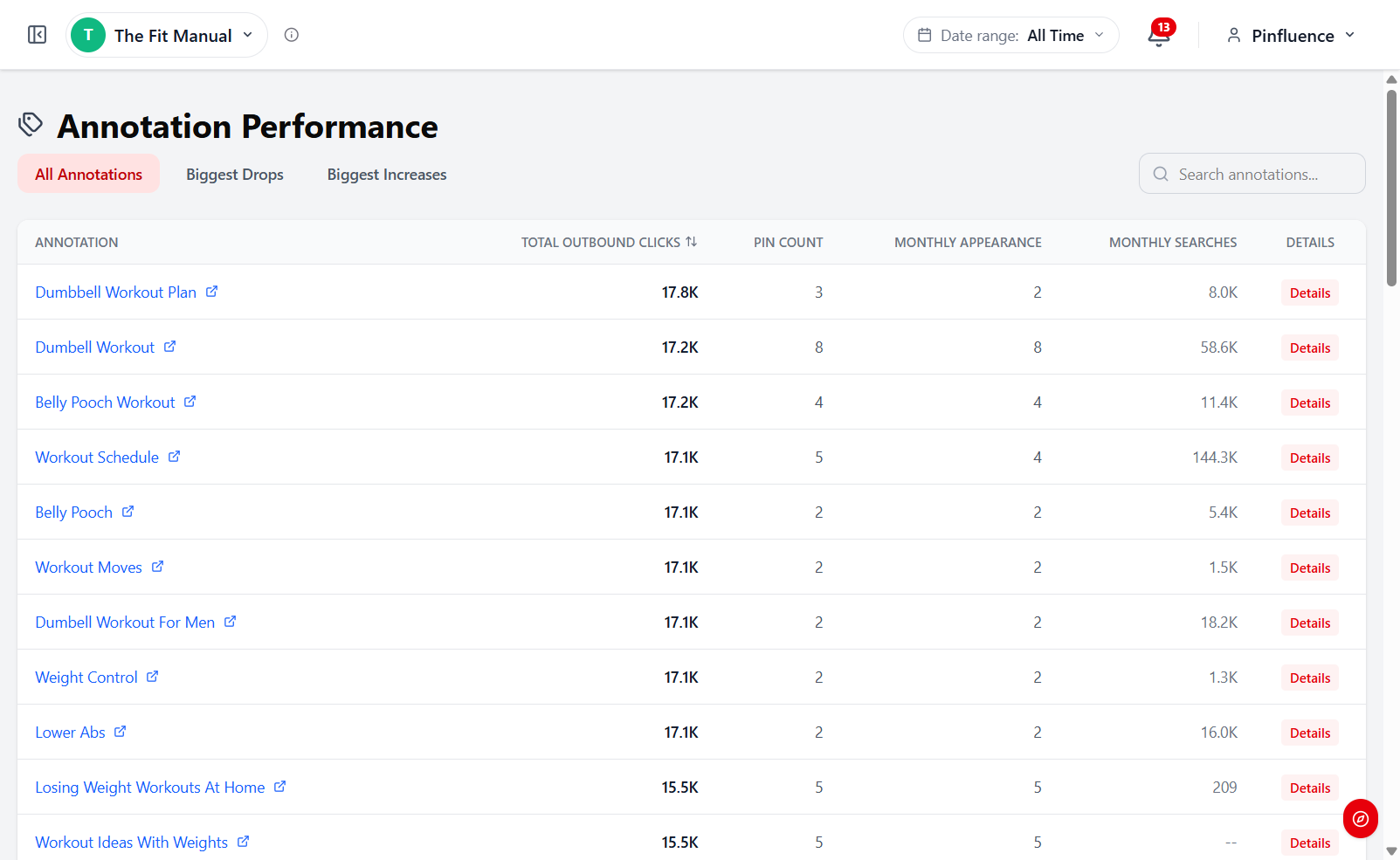
Pinterest tags every pin with the topics it thinks the pin is about. Intel ranks those topics by the clicks they send you, so you see the exact phrases carrying your traffic.
Each topic sits next to its pin count and monthly search demand. You can tell a topic you’re already winning from one with demand you’ve barely touched.
Board Performance
Find out which boards are actually pulling their weight.
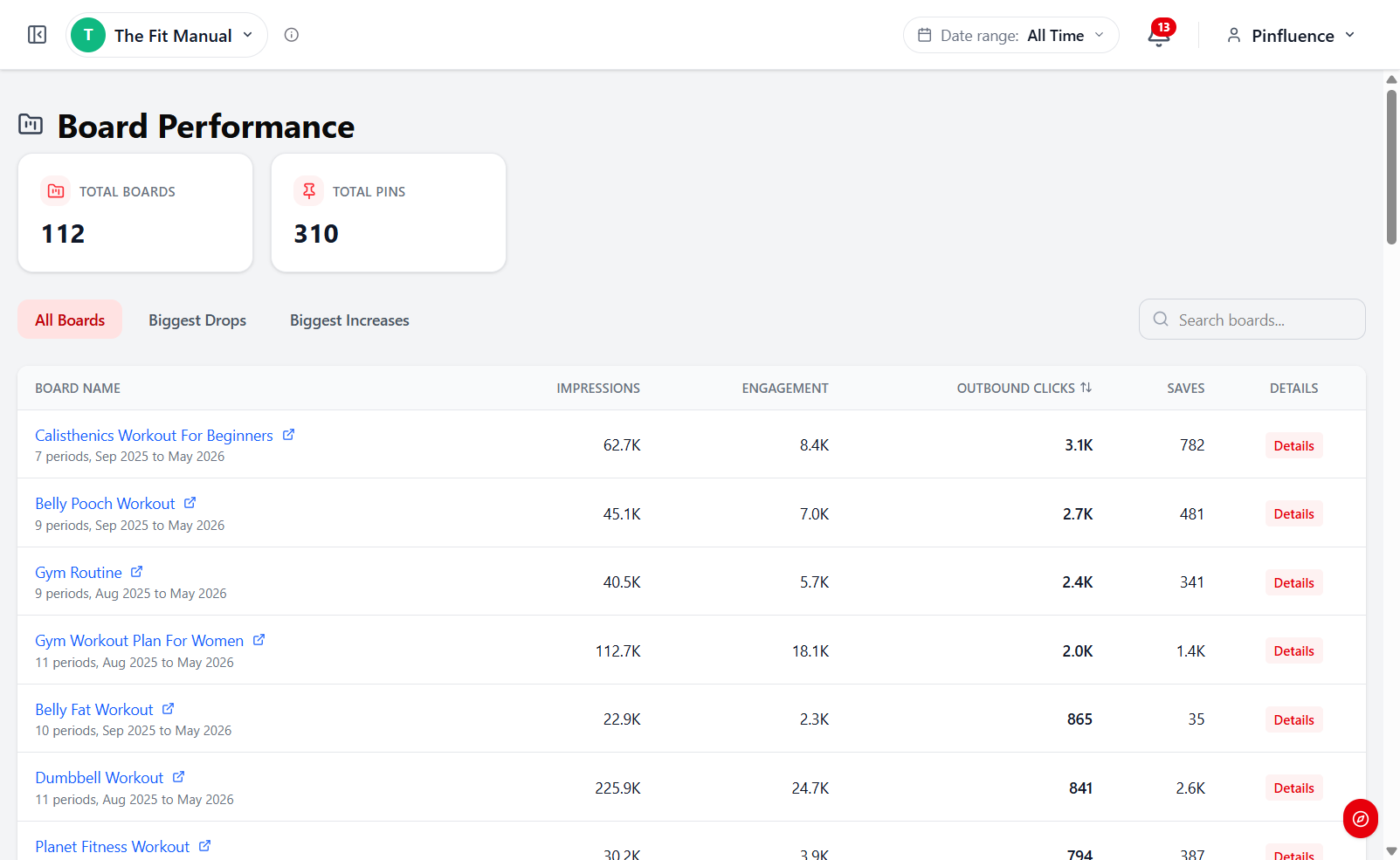
Some boards quietly outperform the rest. Intel ranks every board by impressions, engagement, outbound clicks and saves over time.
See which boards are climbing and which are fading, then decide where to keep pinning, what to refresh and what to retire. It’s the same logic as Top Pins, one level up.
Pin Protection
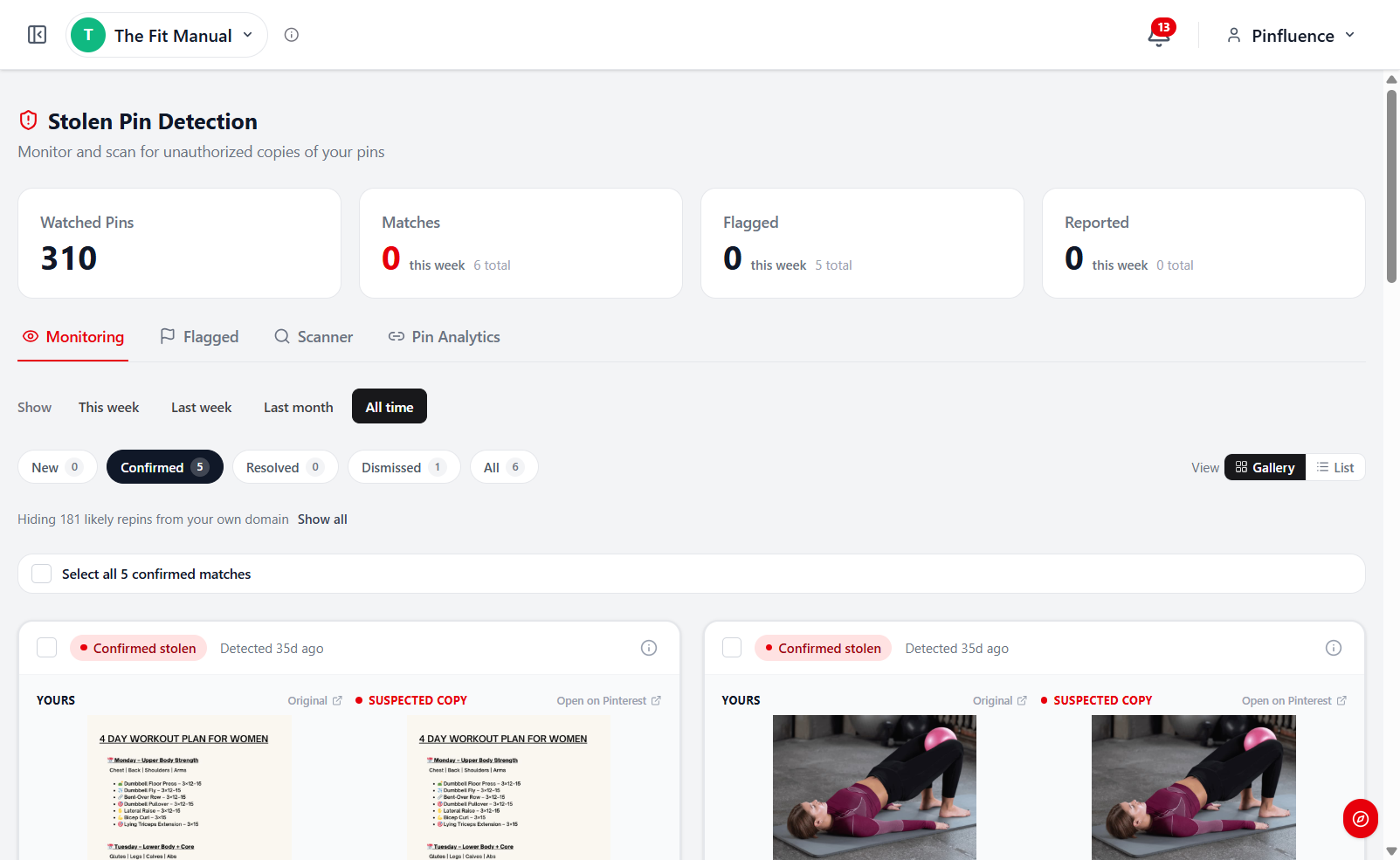
Know when someone copies your pins.
When a pin does well, it gets copied. Intel uses image matching to find your top pins on other accounts, and shows each copy next to your original with the account that posted it.
Monitoring runs in the background on every plan, so new copies surface as they appear. For on-demand checks, Pro gives you 250 manual scans a month and Max has no limit.
Who Intel is for, and who it isn’t.
It’s for you if you pin for your own blog, shop, or clients, and you want to decide what to make next from your own numbers.
It’s for you if a seasonal post did well last year and you can no longer see how well.
You don’t need a paid plan yet if you have only just opened your account. Start on the free plan, upload your first export, and upgrade when you have stats worth keeping.
You need Pro, not Starter, if you manage more than one Pinterest account, upload more than once a month, or want Pin Analytics and on-demand stolen-pin scans.
Everything you get, plan by plan.
Every plan includes Intel, our analytics and pin-protection tool, and Discover, our keyword research tool. Starter includes the core of each.
Just starting out
Starter
The essentials. Keyword research with real search numbers, analytics for one Pinterest account, and automatic stolen-pin alerts.
- 1 Pinterest account, history kept for good, 1 upload a month
- Pin, link and board performance, ranked by clicks
- Automatic stolen-pin alerts by email
- Discover with 25 keyword searches a day, with search volume
Growing and serious about Pinterest
Pro
The full Discover + Intel toolkit. Every research and analytics feature, with no daily search limit.
- 5 Pinterest accounts with unlimited uploads
- Pin Analytics (50 pins per paste) and Account Analysis
- 250 on-demand stolen-pin scans a month, scan-all, and auto-watch on your own domains
- 50 keyword reports a month built from your own account’s data
- Discover with unlimited searches and Competitor Analysis
Want your AI assistant to do the research
Max
Our entire suite of tools, plus your AI assistant. Ask Claude or ChatGPT about real Pinterest data, plus Pinfluence Pipeline (Beta) and the highest limits.
- Everything in Pro
- AI access: connect Claude, ChatGPT or another AI assistant (MCP), 25,000 calls a month
- Pinfluence Pipeline (Beta), our pin planning and publishing workflow
- 10 Pinterest accounts and unlimited stolen-pin scans
- Pin Analytics up to 100 pins per paste, 100 keyword reports a month
Pricing
Pick the tier that fits.
Starter covers one Pinterest account with 1 upload a month. Pro adds unlimited uploads, Pin Analytics and up to 5 accounts.
USE CODE PIN20 AT CHECKOUT FOR 20% OFF
20% off every renewal, for as long as your subscription stays active.
Pinfluence Starter Billed monthly
$12.49/mo regular
$9.99/mo
with code PIN20
✓1 Pinterest account, 1 analytics upload a month
✓Your history kept for good
✓Automatic stolen-pin monitoring with email alerts
✓Pin, link and board performance
✓Discover included: 25 keyword searches a day, with search volume
Best for one account that wants its history kept and its pins watched.
Start with Starter7-day money-back guarantee
Pinfluence Pro Billed monthly
$37.49/mo regular
$29.99/mo
with code PIN20
✓5 Pinterest accounts, unlimited analytics uploads
✓Pin Analytics (50 pins per paste) and Account Analysis
✓250 stolen-pin scans a month, scan-all, auto-watch
✓50 keyword reports a month from your own data
✓Discover with unlimited searches, 5,000 tracked keywords
Best for creators who upload more than once a month or run several accounts.
Get the full toolkit7-day money-back guarantee
Pinfluence Max Billed monthly
$62.49/mo regular
$49.99/mo
with code PIN20
✓Everything in Pro
✓AI access: ask Claude or ChatGPT about real Pinterest data, 25,000 calls a month
✓Pinfluence Pipeline (Beta), our pin planning and publishing workflow
✓10 Pinterest accounts and unlimited stolen-pin scans
✓Pin Analytics up to 100 pins per paste
Best if you want to ask your AI assistant about real Pinterest data.
Get the full suite + AI7-day money-back guarantee
Not ready to pay? Start free today and upgrade when you have stats worth keeping.
The 7-Day Money-Back Guarantee
Try it for 7 days. If it’s not for you, you get every cent back.
Sign up and use every feature in your plan. If it isn’t right for you, email info@pinfluencing.com within 7 days of your first payment for a full refund, no questions asked.
Pick my planFrequently asked questions.
Why do I upload CSVs? Can’t Intel pull from my Pinterest account automatically?
By design, no. Pinterest’s terms don’t allow third-party tools to automatically store your extended analytics history, so Intel uses the export Pinterest already gives you.
How does stolen pin detection work?
When you upload your analytics, Intel fingerprints your top pins and compares them against the public Pinterest images in our research database. Detection is informational: we flag exact or near-exact matches, but we don’t file takedowns or contact anyone for you.
Does Intel work for accounts that are brand new?
Yes, though the value compounds over time. The longer you use Intel, the more history you keep that Pinterest no longer shows.
What’s a “Keyword Insight”?
A report on a single keyword or theme, built from your own account’s data plus the Pinterest search data in our research database. Pro includes 50 a month and Max 100; Starter doesn’t include them.
Can I import multiple Pinterest accounts?
Pinfluence Starter covers 1 Pinterest account. If you run several sites or manage client accounts, Pinfluence Pro covers 5 accounts and Pinfluence Max covers 10.
What’s your refund policy?
You’re covered by the 7-Day Money-Back Guarantee on monthly and annual plans: email us within 7 days of your first payment for a full refund, no questions asked. You can also cancel anytime.
What if I cancel? What happens to my data?
Your uploaded data and reports are kept for 12 months after you cancel, then deleted, and copied-pin monitoring stops. You can ask us to delete your data sooner at any time.
Which plan do I need?
Starter suits one Pinterest account that uploads once a month and wants copied-pin alerts. Pro is the full Discover + Intel toolkit for up to 5 accounts, with unlimited uploads, Pin Analytics, Account Analysis and on-demand scans; Max adds your AI assistant, Pinfluence Pipeline (Beta), 10 accounts and unlimited scans.
Keep every month of your Pinterest analytics. Starting now.
Start on Starter for $9.99 a month, or go straight to Pro for unlimited uploads and up to 5 accounts. Code PIN20 keeps 20% off every renewal while you stay subscribed.
Pick my plan✓7-day money-back guarantee · Cancel anytime
or start free today to test it out →Pinfluence Intel is an independent tool and is not affiliated with, endorsed by, or sponsored by Pinterest, Inc. Pinterest is a registered trademark of Pinterest, Inc.